Unity vs Three.js: why I dropped the engine for the browser
A hands-on comparison from someone who shipped both to GCC developers: reach, load times, the interface, live data, and the daily iteration, with code on both sides. Why the browser became my default for interactive maquettes and twins, and the honest cases where Unity still wins.

Let me be precise before this gets quoted out of context: I did not quit Unity. I still open it every month, and for a headset build I reach for it first. What changed is the default. For years, when a developer needed an interactive experience a client could open, share, and decide from, I built it in Unity. Now the default is the browser, on Three.js and React Three Fiber. This is the long version of why, and it is written to actually be useful to two people: the developer deciding what to commission, and the artist or studio deciding whether to make the same move.
I have led VR and 3D departments and shipped interactive archviz across Saudi Arabia, the UAE, and the wider GCC: sales-center installations, unit configurators, walkthroughs, digital twins. So this is not a framework opinion formed on a weekend. It is a comparison paid for in failed demos, blown load times, and the specific silence of a client who cannot open the thing you spent six weeks building. I will show you real code from both sides, because the difference is concrete, not philosophical.
Credit where it is due: what Unity is genuinely great at
Unity's ceiling is high and its floor is comfortable. The editor is a real authoring environment: drag a prefab, wire a script, hit play, iterate. For a 3D artist crossing into interactivity, that loop is a gift. C# is pleasant, the physics are mature, the animation tooling is deep, and the asset store means most problems are a purchase away rather than a research project. HDRP in particular produces genuinely filmic real-time interiors: area lights, volumetrics, screen-space reflections, physically based everything.
So for anything that runs as an installed application, Unity is still my answer. Standalone VR on a Quest, a kiosk that boots into a locked build on hardware you own, a simulation with heavy physics or crowd systems. When I control the machine and the machine has a headset or a real GPU, Unity wins and it is not close. If peak fidelity on capable hardware were the only metric, this article would not exist. It exists because most of my clients are not standing at that machine.
The problem was never the engine. It was the delivery.
Here is the moment that broke the Unity default for me, and it happened more than once. A developer's decision-maker is on a call from London or Riyadh. The sales director wants to show him the new tower now, in this meeting, while the intent is hot. The experience exists. It is beautiful. And it needs a two-gigabyte download, a Windows machine, admin rights the client's laptop does not grant, and a GPU his ultrabook does not have.
So what actually happens is someone screen-shares a laggy remote session, the real-time magic collapses into a stuttering video, and the moment passes. We did not lose to a competitor's better render. We lost to friction. And friction, I eventually accepted, is a property of the delivery format, not a bug I could patch out of one more build.
A stunning experience nobody can open loses every time to a good one that opens in a browser tab. Reach beats fidelity the instant a decision is on the line.
But Unity exports to WebGL, so why not just do that?
Fair objection, and I lived inside it for a long time trying to make it work. Unity's WebGL target compiles your C# to WebAssembly and renders through WebGL. On paper it solves everything. In production it traded my problems for worse ones.
Build size and startup: a meaningful Unity WebGL build is tens of megabytes before your actual 3D content, because you ship a compiled engine, a WASM runtime, and the scripting backend down the wire. First load means downloading that, compiling WebAssembly, and warming up before a single pixel appears. On mid-range mobile data, that is the reason people close the tab. Memory: Unity WebGL preallocates a large heap, and on iOS Safari, where most of my traffic lives because these links get shared on WhatsApp, that heap is exactly what makes the browser kill the tab. I lost real weeks to out-of-memory crashes that only reproduced on specific iPhones.
And the UI island: the Unity canvas is a walled world. Your unit-filter panel, your price sidebar, your booking form, all of it either gets rebuilt inside the engine or awkwardly bridged to the HTML around it. Every interaction between the 3D and the page becomes a message passed across a boundary. It works. It is never clean. For a self-contained game on a page, WebGL export is fine. For a lightweight, shareable, mobile-first sales tool that has to live inside a real website, it was the wrong shape.
What the browser actually changed
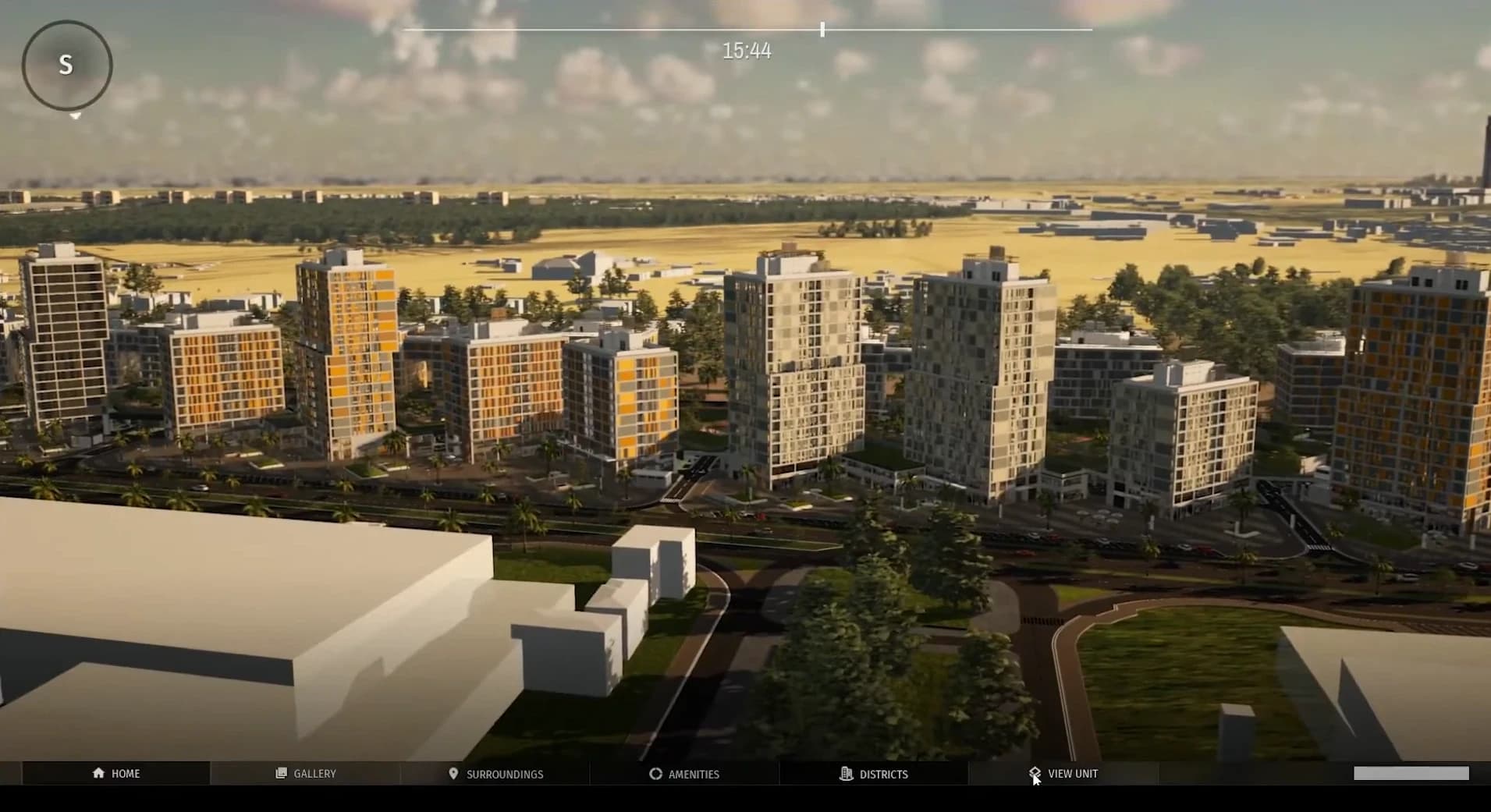
Three.js is not an engine in Unity's sense. It is a rendering library sitting directly on WebGL, now moving to WebGPU. No editor, no C#, no asset-store safety net. You write more yourself. That sounds like a downgrade until you see what it buys: the experience becomes a URL. No install, no permissions, no IT ticket, no hardware assumption. The decision-maker taps a link and thirty seconds later is orbiting the tower on the same phone he reads email on.
The builds are small and first paint is fast, because you ship only what the scene needs: a GLB compressed with Draco or Meshopt, KTX2 basis-compressed textures, a few hundred kilobytes of JavaScript. I have shipped browser scenes that start rendering in one to two seconds on mobile, something I could never promise from a Unity WebGL export. The honest trade-off is a lower raw ceiling than HDRP on a real GPU. But with baked lighting, well-authored PBR materials, image-based lighting from a good HDRI, and a restrained post stack, a browser interior today looks far better than it has any right to, and it looks that good on a phone.
The UI is just the web now, and that is bigger than it sounds
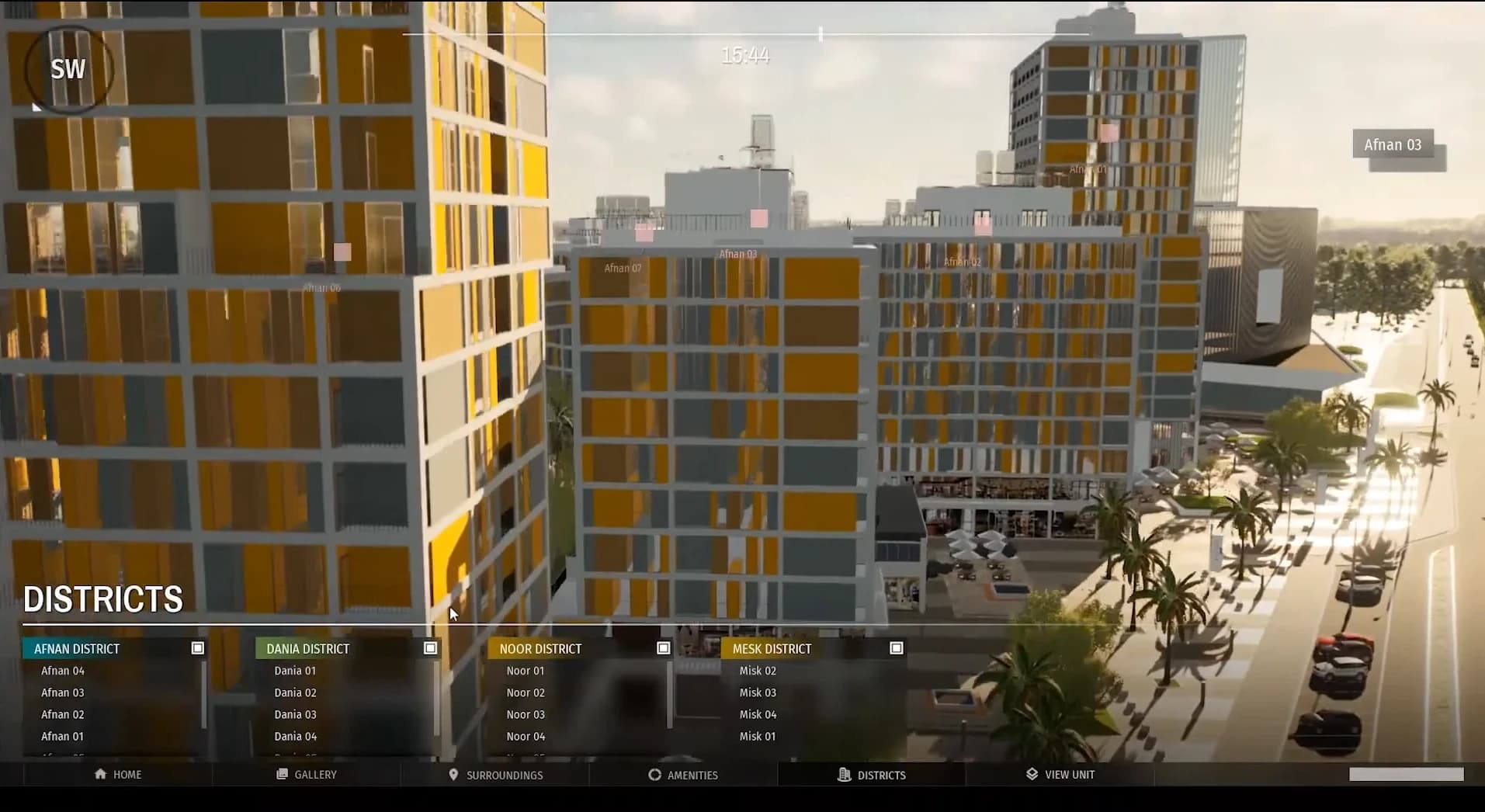
This is the part people underestimate, and it is the one you asked me to spell out. In Unity, your interface is uGUI or UI Toolkit: canvases, prefabs, anchored rects, and C# components you wire in the Inspector. It is capable, but it is a second UI system that has nothing to do with the web the rest of your product is built in, and it is sealed off from the 3D by an engine boundary. Want your unit list to update when the buyer highlights a floor? You reach into the 3D from a script, then reach into the list, and you keep the two in sync by hand, forever.
With React Three Fiber the interface is just HTML, CSS, and React, the same stack your website already uses. The 3D scene is expressed as components too, so the tower and the filter panel are not two worlds bridged by messages. They read from one state store and re-render together. When a buyer filters for two-bedroom units, the tower highlights them in the very same frame the list updates, because the list and the tower are reading the same value. There is no bridge to keep in sync, because there is no bridge.
Highlight 2-bedroom units when a filter is toggled
// Panel.cs (MonoBehaviour), refs wired in the Inspector
public Toggle twoBed;
public TowerView tower;   // drag the 3D object in
public UnitList  list;

void OnEnable() =>
  twoBed.onValueChanged.AddListener(v => {
    tower.Highlight(beds: 2, on: v);  // push into the 3D
    list.Refresh();                   // and the list, by hand
  });

// The UI lives in the engine canvas, walled off
// from your website's DOM. Two worlds, one bridge
// you now own forever.// one store; panel and tower both read it
const beds = useUnits(s => s.beds)
// the panel is plain HTML + CSS
<label>
<input type="checkbox"
onChange={e => setBeds(e.target.checked ? 2 : null)} />
2 bedrooms
</label>
// the 3D is a component reading the same value;
// the list re-renders in the same frame
<Tower highlight={beds} />Live data is a fetch, not a plugin
The second thing that quietly decides these projects is talking to your data: inventory, availability, prices, and increasingly live signals from the building itself. In Unity you use UnityWebRequest inside a coroutine, and then you meet the JSON problem. Unity's built-in JsonUtility cannot deserialize a bare array or a dictionary, so real projects pull in Newtonsoft.Json and manage that dependency across platforms. Want live updates instead of a one-time load? You are now sourcing and shipping a native WebSocket plugin, and testing it separately on every target.
On the web, JSON is the native language of the platform, so parsing is free and correct by default. A fetch is one line, caching and refetching are a hook with React Query, and live data is a WebSocket that already exists in every browser with no plugin and no per-platform build. This is the difference between a maquette that shows a fixed unit list and a real sales tool that greys out a unit the second another agent reserves it, on every device, with a few lines of code.
Load availability, then keep it live
IEnumerator Load() {
  var req = UnityWebRequest.Get(api + "/units");
  yield return req.SendWebRequest();
  if (req.result != UnityWebRequest.Result.Success)
    yield break;

  // JsonUtility can't parse a bare array,
  // so add Newtonsoft and manage the dependency:
  var units = JsonConvert
    .DeserializeObject<Unit[]>(req.downloadHandler.text);
  Apply(units);
}

// Live updates? Ship a native WebSocket
// plugin and test it per platform.// JSON is the platform's language; parsing is free
const { data: units } = useQuery(['units'],
() => fetch('/api/units').then(r => r.json()))
// live is one effect, identical on every device
useEffect(() => {
const ws = new WebSocket(WS_URL)
ws.onmessage = e =>
patchUnit(JSON.parse(e.data)) // grey it out live
return () => ws.close()
}, [])Maquette and twin are the same browser scene
The two interactive products developers actually commission are the digital maquette and the digital twin, and it pays to be precise about the difference. A digital maquette is the interactive sales model: orbit the tower, peel the floors apart, tap a unit to see its plan and its view, share the whole thing as a link. A digital twin is that same model plus the living data: it connects to the systems that describe the real state of the building, from unit inventory to building management sensors, and it reflects them.
Here is the part that matters for this article. On the web, both are the same Three.js scene. The maquette and the twin are not two technologies, they are one R3F app with the data layer switched off or on. Every unit is a component that reads its state and paints itself; the only question is where that state comes from. Point it at a static JSON and you have a maquette you ship for launch. Point the same components at a live feed, a CRM, a booking system, building sensors, and you have a twin, without rebuilding a single piece of geometry. That continuity is almost impossible to feel from a Unity build, where the sales version and the connected version tend to become two separate projects. Wiring that live layer to a CRM so unit status reflects on the model in real time is a subject of its own, and I gave it a separate piece.
The feedback loop: seconds, not a coffee break
There is a less glamorous factor that decides how good the final thing gets: how fast you can try an idea. In Unity, a C# change triggers a domain reload, and on a large project entering play mode is a wait; a WebGL build to actually verify in a browser is minutes, sometimes tens of minutes. You batch your experiments because each one is expensive.
On a Vite-based R3F project, hot module replacement swaps the changed code into the running scene in well under a second, with your camera and state intact. Tweaking light intensity, material roughness, or the easing on a transition becomes a live conversation with the scene instead of a build-and-wait cycle. Over a project that difference compounds into hundreds of small refinements you would never have bothered to try, and refinement is most of what separates a demo from something that sells.
React Three Fiber is what makes it production-grade
Raw Three.js is powerful but verbose: you manage the render loop, dispose geometries by hand, wire everything imperatively. R3F lets you describe the scene declaratively, and its ecosystem is what turns a clever demo into something you can hand off. Drei gives you cameras, controls, loaders, and environment helpers that used to cost days. React Three Postprocessing gives you the cinematic grade, bloom, ambient occlusion, tone mapping, in a few lines.
And there is a commercial argument I did not appreciate until clients started thanking me for it: maintainability. A bespoke Unity project marries the client to a small pool of Unity developers. An R3F project is a React app, so any competent web team the client already employs can maintain and extend it. When you are choosing what to commission, that is not a technical footnote, it is who owns your asset three years from now.
An honest scorecard
Reach and sharing: Three.js wins decisively. A link on any device beats an install every time.
First load on mobile: Three.js wins. Kilobytes to single-digit megabytes versus tens of megabytes plus WASM warmup.
Interface and integration with a real website: Three.js and R3F win. The UI is the web, and it shares one state tree with the 3D instead of talking across an engine boundary.
Live data, CRM, and APIs: Three.js wins. Native JSON, one-line fetch, built-in WebSockets, no per-platform plugins.
Iteration speed: Three.js wins on the web loop. Sub-second hot reload versus domain reloads and multi-minute WebGL builds.
Peak visual fidelity on capable hardware: Unity HDRP wins. At a controlled high-end machine, nothing browser-based matches it yet.
VR and headset delivery: Unity wins. WebXR is improving, but for a serious headset experience I still build native.
Physics, simulation, heavy interactivity: Unity wins. That is what a game engine is for.
On-ramp for a solo artist just starting: Unity wins. The editor is a genuinely faster first week than a code-first stack.
So which should you use
If the deliverable is something a client, a buyer, or the public needs to open, share, or embed, in a meeting, on a phone, in a WhatsApp follow-up, build it for the browser. That is the ninety-percent case in real estate marketing, and it is where Three.js and R3F now win outright for me: the interface is the web, the data is a fetch away, and the whole thing is a link.
If the deliverable runs on hardware you control, lives in a headset, or leans on heavy physics and simulation, reach for Unity, or Unreal for the top of the fidelity range. The engine is not the point. The point is matching the tool to how the decision actually gets made.
And if your interactive project today is trapped inside an installer, that is the first thing I would change. It is usually the cheapest upgrade with the largest return: the same 3D work, the same models and lighting, seen by a hundred times more of the people whose yes you actually need.

Moustafa Moussa
3D technical art director. I make the unbuilt feel real.